
Orbit by NovaTech
A calm, private browser for everyday use
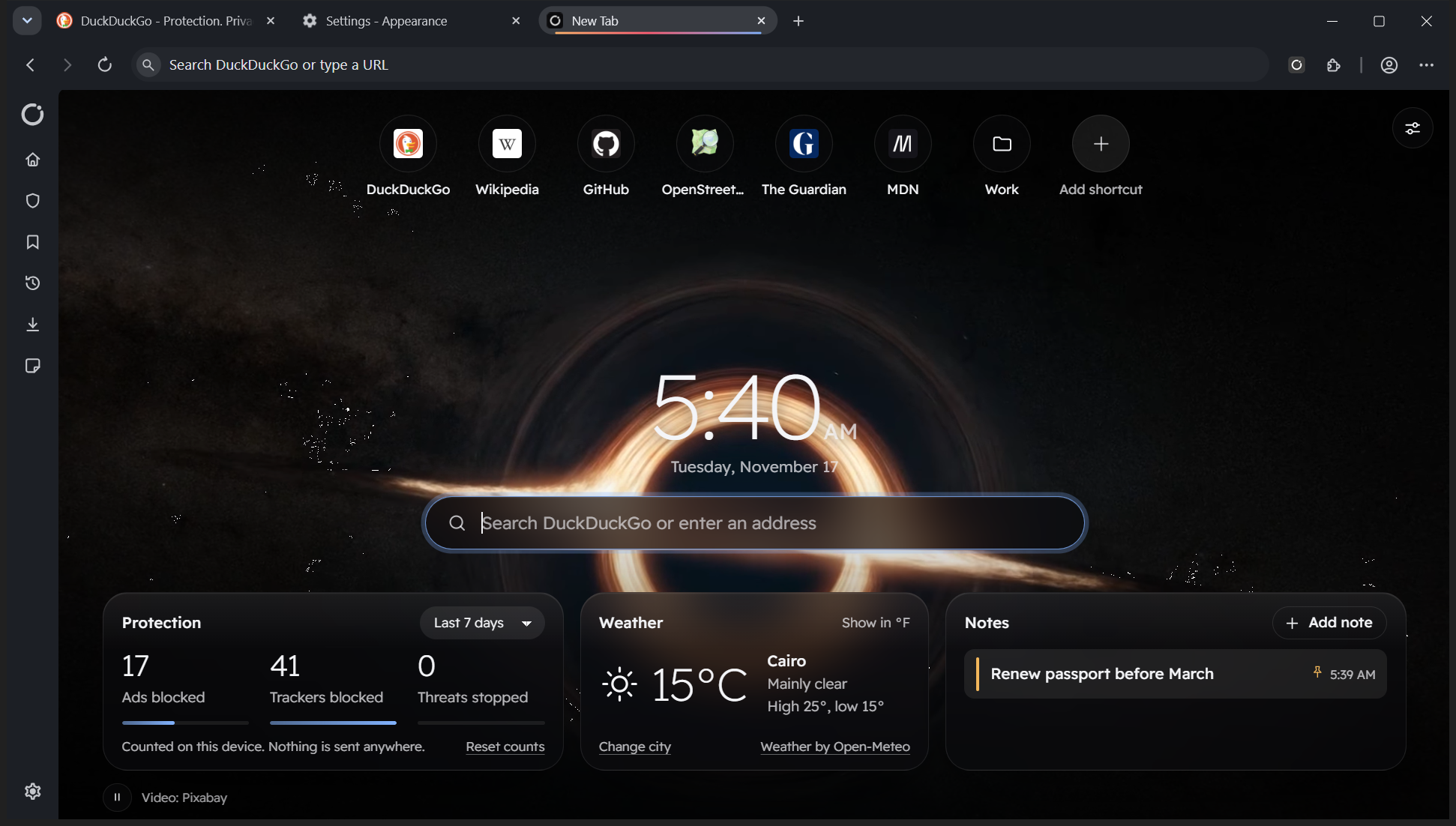
Orbit blocks ads and trackers, keeps your data on your device and opens to a new view of space every day. Built on Chromium, so your sites just work.
Version 1.0.8 · Windows, macOS and Linux
- Free
- Open source
- No accounts
- No ads
Everything you need, nothing watching you
Orbit is set up the private way from the start, so you can just use it.
Blocks ads and trackers
Ads, trackers and known harmful sites are blocked before they load, and Orbit shows how many it stopped.
Private by default
HTTPS only, encrypted DNS and DuckDuckGo search are on from the first start. There is nothing to configure.
No accounts, no telemetry
Orbit has no sign-in and sends no usage data. Your history, notes and settings stay on your device.
A new tab worth opening
A new video of space and nature every day, quick notes, weather and your shortcuts on one calm page.
Stays up to date
On Windows and Linux, Orbit installs new versions by itself, checked with Orbit's signing key.
Built on Chromium
The same engine as Chrome and Edge, so your sites work and feel as fast as you expect.
Your browsing stays yours
Orbit has no account to sign in to and no server that collects what you do. Blocked-ad counts, notes and history are kept on your device, and nothing is sent to NovaTech.
Read Orbit's privacy policy- No sign-in or sync
- No usage data
- Search with DuckDuckGo
- Encrypted DNS and HTTPS only
Download Orbit
Latest version 1.0.8. Free for Windows, macOS and Linux.
Windows
Windows 10 or 11, 64-bit
The installer is not code-signed yet, so Windows may show a SmartScreen notice. Choose More info, then Run anyway.
macOS
Macs with Apple silicon (M1 and newer)
Signed and notarized by Apple. Open the disk image and drag Orbit to Applications.
Linux
64-bit Ubuntu, Debian and other distributions
The .deb adds Orbit to your system updates. The archive runs anywhere but does not update by itself.
Questions about Orbit
Is Orbit really free?
Yes. Orbit is free and open source, with no paid plan, no ads and no data sold. NovaTech builds it as its own product.
What does Orbit send over the internet?
Only what a browser needs: the sites you open, update checks and the services you turn on, such as weather. The privacy policy lists every connection.
Can I bring my bookmarks and passwords from another browser?
Yes. When you first open Orbit, it offers to bring your bookmarks and history from Chrome, Edge, Brave, Firefox, Opera, Vivaldi and other browsers, and shows you how to move your passwords. You can skip it and do it later from Settings.
Is there a version for phones?
Not yet. Orbit is available for Windows, macOS and Linux today.
Open source, in Arabic and English
Every line of Orbit is public, and every download is built from that code. Found a problem or have an idea? Tell us on GitHub.